


Crown vs. OpenBCI: Which EEG Headset Actually Wins?

Two Philosophies, Two Very Different Buyers
There's a moment in every curious person's life when they realize they want to read brain signals. Maybe they watched a demo of someone controlling a cursor with their thoughts. Maybe they read a paper on neurofeedback for ADHD brain patterns. Maybe they wondered what their own flow state actually looks like in their brain. Maybe they thought, "What if I could give ChatGPT access to my brain data in real time?"
Whatever the spark, the next step is always the same: you start shopping for an EEG headset. And if you've done any research at all, two names keep surfacing. The Neurosity Crown. And OpenBCI.
These aren't just two products. They're built for two very different people.
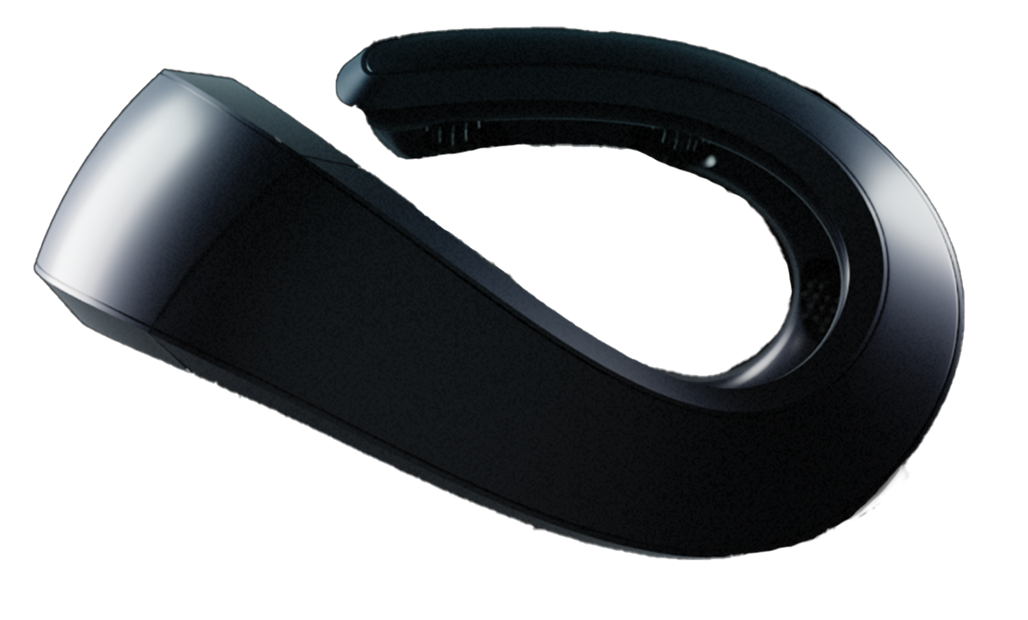
The Crown is built for almost everyone interested in using brain data: meditators tracking calm, knowledge workers tracking focus, biohackers testing supplements, neurofeedback enthusiasts, researchers running mainstream EEG protocols, creators building brain-responsive experiences, developers building applications. It handles the hard parts (signal processing, artifact rejection, powerline noise removal, an SDK that talks to modern tools and AI) so the user doesn't have to.
OpenBCI is built for a narrower, specific kind of person: hardware tinkerers who want to modify the device itself, researchers running protocols that require electrodes at cortical sites the Crown's fixed 8-position layout doesn't cover, and projects that require fully open-source hardware schematics for academic, regulatory, or supply-chain auditability reasons. If you're in that group, OpenBCI is genuinely the right tool. If you're not, you'll be fighting the tool the entire time you should be using it.
That's the honest version of this comparison. Let's break down where each device actually lives, no sales pitch. Just signal.
What You're Actually Comparing
Before we get into specs, it helps to understand what each device is at a fundamental level.
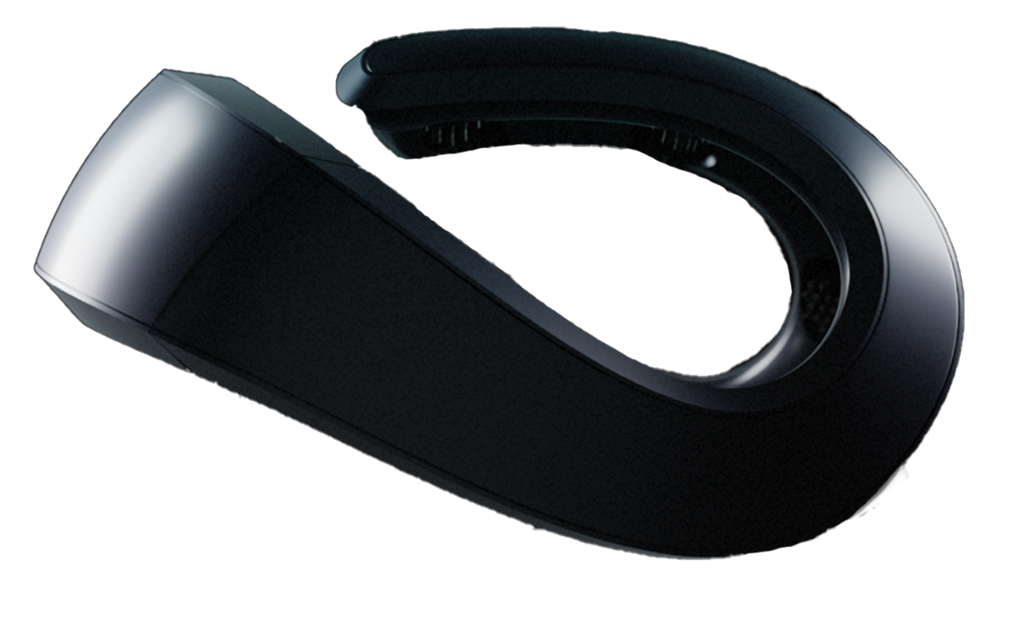
The Neurosity Crown is an integrated brain-computer interface. It's a single product: headset, processor, electrodes, firmware, on-device operating system, SDK, and suite of apps, all designed to work together. You take it out of the box, put it on your head, connect it to Wi-Fi, and start getting brain data. The Crown runs its own N3 chipset hosting a full on-device operating system that processes EEG signals locally, meaning your raw brainwave data never has to leave the hardware unless you explicitly want it to. New capabilities, like native MCP support, ship as over-the-air updates to hardware already in the field.
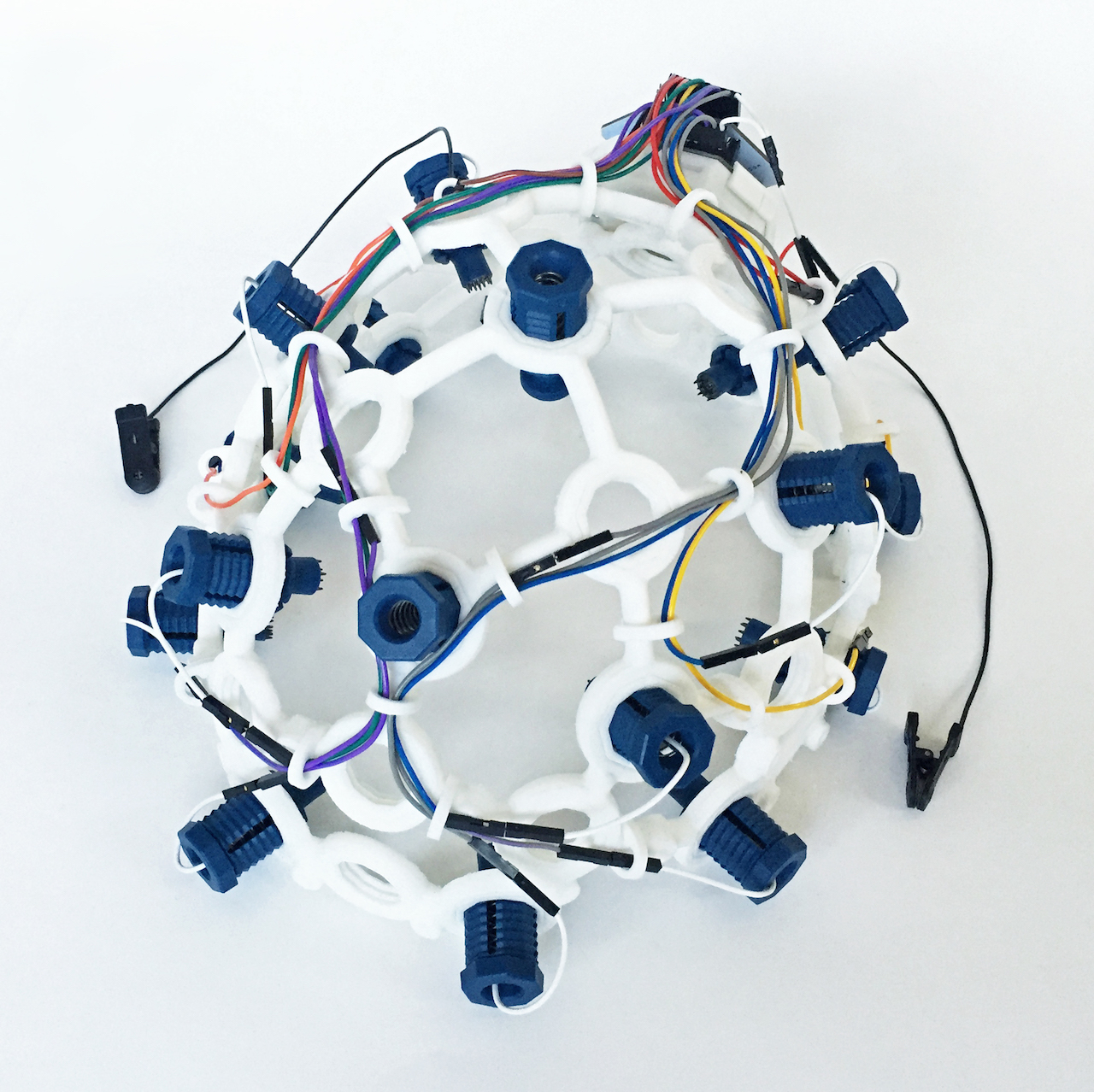
The OpenBCI Ultracortex Mark IV is a headset frame designed to hold electrodes that connect to OpenBCI's Cyton biosensing board. OpenBCI sells the Ultracortex in three configurations at $899.99: Pro-Assembled (ready to use), Unassembled (parts plus 3D-printed pieces), and Print-It-Yourself (no 3D-printed pieces, for users with their own printer). The Cyton is an 8-channel (expandable to 16) analog-to-digital converter that samples biosignals and streams them over a proprietary 2.4 GHz radio link to an included USB dongle (or via a Wi-Fi Shield as an add-on). OpenBCI is open-source, meaning the hardware designs, firmware, and software are all publicly available. You can modify anything.
Here's the key mental model: the Crown is an iPhone. OpenBCI is a Raspberry Pi. Both can do incredible things. But the path to getting there looks very different.
The Specs, Side by Side
Numbers matter. Let's put them on the table.
| Feature | Neurosity Crown | OpenBCI Ultracortex + Cyton |
|---|---|---|
| EEG Channels | 8 (fixed positions) | 8 (expandable to 16 with Daisy module) |
| Sample Rate | 256 Hz | 250 Hz (Cyton) / 200 Hz (Ganglion) / 125 Hz (Cyton+Daisy 16ch) |
| Electrode Type | Dry flexible rubber | Wet (Ag/AgCl) or dry (comfort or spike) |
| Electrode Positions | CP3, C3, F5, PO3, PO4, F6, C4, CP4 | User-configurable, up to 35 locations on Mark IV |
| On-Device Processing | Yes (N3 chipset with on-device OS) | No (raw data streamed to computer) |
| Weight | 228g | Not officially published |
| Battery Life | 3 hours | Varies by configuration (4xAA or LiPo; typically many hours of continuous recording) |
| Setup Time | ~2 minutes | Per-session electrode prep and impedance checks; one published EEG researcher documented 2 days of troubleshooting to get clean Mark IV readings on OpenBCI's own forum |
| Assembly Required | None | Ultracortex available Pro-Assembled, Unassembled, or Print-It-Yourself (all $899.99); electrode mounting and wiring in the two non-assembled paths |
| Price Range | $1,499 | $624.99 (Ganglion) / $1,249 (Cyton) / ~$2,150+ (Cyton + Ultracortex, 8ch) / more for 16ch w/ Daisy |
| SDK & Protocols | JavaScript, Python, BrainFlow, LSL, OSC, MCP | Python (BrainFlow), C++, Java, many via BrainFlow; LSL; no native MCP/OSC |
| Built-in Metrics | Focus, Calm, Kinesis scores, Raw EEG | None (raw EEG only) |
| Native AI Integration | ||
| Cloud Platform | Neurosity cloud (included) | None (local-only; BYOC via BrainFlow) |
| Data Security | Hardware-level encryption (N3) | Unencrypted radio stream to host (Cyton: proprietary 2.4GHz; Ganglion: Bluetooth LE) |
| Open-Source Hardware | No | Yes (full schematics available) |
| Companion App | Mobile app (iOS and Android), web dashboard, ChatGPT and Claude integration via MCP | OpenBCI GUI (desktop) |
These numbers tell a story, but they don't tell the whole story. The real differences show up when you actually try to use these devices.
The Setup Experience: Five Minutes vs. Five Hours
Here's something that spec sheets never capture: the feeling of taking a device out of the box and trying to do something with it.
With the Crown, you open the box, put the headset on your head, download the Neurosity app, connect to your Wi-Fi network, and you're looking at your brain data. The whole process takes about two minutes. The dry electrodes make contact through your hair. The app shows you signal quality for each channel. If a channel looks noisy, you adjust the fit slightly. Done.
With OpenBCI, your first experience is... different. If you buy the Unassembled or Print-It-Yourself Ultracortex, you're threading electrodes through 3D-printed nodes, attaching them to the frame, and connecting them to the Cyton board with thin cables before you can do anything. The Pro-Assembled option skips that step, but from there the path is the same. OpenBCI offers both wet (Ag/AgCl) and dry (comfort or spike) electrode options. Wet electrodes give better signal quality in lab conditions but require conductive gel, syringes for application, and a plan for cleanup afterward. Dry electrodes skip the gel step but still need careful seating and impedance checks per session.
Then you install the OpenBCI GUI on your computer, pair the Cyton board (which uses its own USB radio dongle, not standard Bluetooth), configure your electrode montage, check impedances, and troubleshoot the channels that aren't making good contact. For wet electrodes, you may need to part your hair and apply gel directly to the scalp at each electrode site.
I want to be fair to OpenBCI here. If you're a neuroscience researcher, this setup process is completely normal. It's what every research-grade EEG system requires. And OpenBCI has done remarkable work making this accessible for a fraction of the cost of clinical systems that run $20,000 to $50,000.
But if you're not a researcher? A developer, a creator, or someone who just wants usable brain data as part of a daily routine? That first experience matters. A lot. Because every minute spent debugging electrode connections is a minute not spent on the thing you actually wanted to build, test, or experience.
Signal Quality: The Question Everyone Asks First
"But which one gives better data?"
This is the question that dominates every forum thread comparing these devices. And the honest answer is: it depends on what you mean by "better."
No on-device processing.
N3 chipset embedded inside
OpenBCI supports both wet (Ag/AgCl) and dry (comfort or spike) electrodes. The signal-quality ceiling we're about to discuss specifically applies to the wet configuration: in a controlled lab setting with wet Ag/AgCl electrodes, proper gel application, and an EM-quiet environment, OpenBCI's Cyton can produce clean raw EEG signal. The Cyton is built around the Texas Instruments ADS1299, research-grade silicon used in some clinical systems. Wet electrodes have lower impedance at the skin-electrode interface, which means less noise. This is physics, not marketing. It's why every clinical EEG lab in the world still uses wet electrodes.
OpenBCI's dry electrode option avoids the gel-and-cleanup overhead but faces the same impedance and artifact tradeoffs that any dry system does, including the Crown's. The Crown uses dry flexible rubber electrodes. Dry electrodes have inherently higher impedance, which means the raw signal contains more artifact. This is a real tradeoff.
But here's where it gets interesting.
The Crown compensates for this in three ways that fundamentally change the equation. First, the N3 chipset performs signal processing on the device itself. It filters, cleans, and extracts features from the raw EEG. Second, the Crown's electrode positions are fixed and optimized. The team at Neurosity spent years figuring out exactly where to place 8 electrodes to capture the most useful information from all four lobes of the brain. Third, the Crown automatically detects and removes powerline noise (50Hz or 60Hz, depending on your region) with no user configuration. You don't pick a notch filter. You don't set your mains frequency. It just works. This is the iPhone pattern applied to signal processing: the hard part is invisible.
There's also an environmental wrinkle the OpenBCI lab advantage runs into outside the lab. The Ultracortex Mark IV is 3D-printed PLA with no built-in electromagnetic shielding, and OpenBCI's own noise-minimization guide notes that mains EMF interference generally can't be shielded at the headset level, so you need a quiet EM environment. 60Hz powerline noise and its harmonics are recurring, documented issues on the OpenBCI forum. In the typical home or office, with screens, routers, and mains power, that theoretical signal-quality ceiling gets harder to reach.
This means that while OpenBCI can give you excellent raw data in a controlled lab setting with perfect electrode application, the Crown often gives you more usable data in real-world conditions. Because in the real world, gel dries out. Electrodes shift. Cables develop intermittent connections. And nobody wants to spend 20 minutes re-applying conductive paste because they moved their head.
For research protocols where you need pristine, artifact-free recordings of specific cortical regions? OpenBCI with wet electrodes is a serious contender. For building applications that need reliable brain data from a person wearing a device while they work, create, or go about their day? The Crown's approach makes more practical sense.
The Software Story: Where the Gap Gets Wide
Hardware gets all the attention in comparison articles. But for developers, software is where you actually live. And this is where the Neurosity Crown vs OpenBCI comparison gets really lopsided.
To see why, it helps to look at where signal processing actually happens in each architecture.
The Neurosity SDK
The Crown ships with a first-party SDK available in JavaScript and Python, fully documented at docs.neurosity.co. If you've ever used a well-designed API, you know what this feels like. It's clean. It's documented. It does what you expect.
Want to stream focus scores in a Node.js app? That's about ten lines of code. Want raw EEG data in a Python notebook for analysis? Straightforward. Want to build a React app that changes its interface based on your brain state? The SDK handles the WebSocket connections, data parsing, and state management for you.
The Crown also provides computed metrics out of the box. Focus scores, calm scores, and kinesis (movement intention) detection are processed on the device and available through the SDK. You don't need to build a signal processing pipeline to get useful cognitive state information.
And then there's MCP. The Neurosity Model Context Protocol server lets AI applications like Claude and ChatGPT access your brain data in real-time. This is not a gimmick. It means you can build applications where an AI adjusts its behavior based on whether you're focused or distracted, stressed or calm. As of 2026, the Crown is the only consumer EEG device we're aware of that ships with an official, vendor-supported MCP server out of the box.
The OpenBCI Software Ecosystem
OpenBCI's software situation is more fragmented. The primary tool is the OpenBCI GUI, a desktop application built on Processing (a Java-based creative coding framework). It's functional for data visualization and recording, but it's not a development platform.
For actual development, most OpenBCI users turn to BrainFlow, an excellent open-source library that provides a unified API for many different biosensing boards (including both OpenBCI and Neurosity, by the way). BrainFlow supports Python, C++, Java, C#, Julia, and R.
Here's the important caveat: BrainFlow gives you raw data access and some basic signal processing. Everything beyond that, feature extraction, classification, application logic, user interface, you're building yourself. There's no equivalent to the Crown's built-in focus and calm scores. There's no companion app. There's no MCP server for AI integration.
There's also no OpenBCI cloud platform. Data stays local by design, which is excellent for privacy but means any remote sync, hosted storage, or backend for a deployed application is something you'd build yourself through BrainFlow and a third-party cloud provider.
This isn't necessarily a weakness if you're a researcher who wants full control over your processing pipeline. But it does mean the distance between "I have a working device" and "I have a working application" is measured in weeks or months, not hours.
Here's something worth knowing: BrainFlow supports both the Neurosity Crown and OpenBCI boards. So if you start building with one device and switch to the other, your BrainFlow-based code still works. The Crown also supports Lab Streaming Layer (LSL), the standard protocol for streaming biosignals in research settings. You don't have to choose between Neurosity's ecosystem and the broader research tool ecosystem. You get both.
The Channel Count Question
OpenBCI's biggest advantage on paper is channel flexibility. The Cyton board supports 8 channels, expandable to 16 with a daisy chain module. And you can place those electrodes anywhere on the scalp using the Ultracortex frame's configurable node system.
The Crown has 8 channels at fixed positions: CP3, C3, F5, PO3, PO4, F6, C4, CP4.
Does this matter? It depends entirely on what you're doing.
For research protocols that require dense spatial coverage of a specific cortical area (say, high-density motor cortex mapping for a BCI speller), 8 fixed channels aren't enough. You need 16, 32, or even 64 channels positioned precisely over the region of interest. OpenBCI's flexibility (or better yet, a full research-grade system) is what you need.
For everything else, 8 channels covering all four brain lobes is a surprisingly powerful configuration.
Here's the "I had no idea" moment in this comparison. Research on common BCI paradigms (motor imagery classification, SSVEP detection, emotional state recognition) suggests that increasing from 8 to 16 channels tends to yield small single-digit percentage gains in classification accuracy for many subjects. Reviews in the BCI literature repeatedly describe diminishing returns beyond a certain point: the jump from 2 channels to 8 is enormous, the jump from 8 to 16 is incremental, and the jump from 16 to 32 is often barely measurable for real-world, non-clinical applications.
The Crown's 8 channels, positioned to cover frontal, central, parietal, and occipital regions bilaterally, capture the vast majority of information that consumer and developer applications actually need. You're getting focus-related frontal beta, relaxation-related parietal alpha, visual processing from occipital regions, and motor-related activity from central electrodes. That's a comprehensive picture of cognitive state from a device that fits on your head like a pair of headphones.
Privacy and Security: The Invisible Differentiator
This is the topic nobody talks about in EEG headset comparisons, but it might be the most important one.
Your brain data is, by definition, the most personal data that exists. It encodes your cognitive states, your emotional responses, your attention patterns, and your neurological health markers. The question of who has access to this data and how it's protected is not academic.
No device-level account
Hardware-level encryption
The Neurosity Crown processes data on the device itself using the N3 chipset. Your raw brainwave data never leaves the hardware unless you explicitly choose to stream it to an application. The N3 includes hardware-level encryption. This isn't just a privacy policy. It's architecture. Your brain data is protected by the same approach that secures banking transactions: encryption at the hardware level.
OpenBCI's Cyton board is an analog-to-digital converter. It samples biosignals and streams them, unencrypted, over a proprietary radio link to a USB dongle on your computer. From there, what happens to the data is entirely up to whatever software you're running. There's no built-in encryption. There's no on-device processing. The raw signal goes from your scalp to your computer with nothing in between.
For a research lab operating under IRB protocols with institutional data security, this is fine. For a consumer-facing application? For a developer building something that will run on other people's heads? The Crown's security-first architecture is a significant advantage.
Real-World Use Cases: Who Should Buy What
Let's get concrete. Here's who each device is actually for.
-
A developer building brain-powered applications. The SDK, the on-device processing, and the MCP AI integration give you a development platform, not just a data source. You can go from idea to working prototype in a day.
-
A creative professional exploring neurofeedback. The built-in focus and calm scores, combined with the Neurosity app, give you a usable neurofeedback experience without writing any code.
-
Someone who wants daily brain data. The 2-minute setup, dry electrodes, and 3-hour battery life make the Crown something you can actually wear while you work. OpenBCI's Ultracortex (wet or dry) is set up per session and built around a rigid frame with screw-down electrodes; it's not designed for casually putting on and going about your day.
-
An AI developer integrating cognitive state. Native MCP support means your AI applications can access brain data through a standardized protocol, not custom middleware. No other consumer EEG device we're aware of offers this out of the box.
-
A researcher who also needs practical BCI applications. The Crown works with BrainFlow and LSL, so you can use it in research pipelines while also building real-world applications on the same hardware.
-
A hardware tinkerer who wants to modify the device itself. Open-source schematics, firmware, and 3D-printable headset designs mean you can customize every aspect of the system. If you want to build your own electrode arrays, integrate custom biosensing hardware, or run unconventional electrode configurations, OpenBCI gives you that freedom.
-
A researcher needing electrodes at sites the Crown's fixed layout doesn't cover. The Crown's 8 positions are fixed at CP3, C3, F5, PO3, PO4, F6, C4, and CP4. If your protocol specifically requires Oz, Fz, T7/T8, or dense coverage of a particular cortical region, OpenBCI's configurable Ultracortex montage gives you that flexibility. (For most mainstream EEG research, the Crown's coverage is sufficient and works in BrainFlow and LSL pipelines.)
-
A project that requires fully open-source hardware. If you're publishing in a context that demands open hardware schematics, working in an institution with open-source mandates, or building something where the supply chain itself needs to be auditable, OpenBCI's fully-open nature is a real differentiator.
The AI Integration Gap
This deserves its own section because it represents the widest gap between these two platforms, and it's the gap that will matter most over the next five years.
As of 2026, the Neurosity Crown is the only consumer EEG device we're aware of that ships with an official, vendor-supported MCP (Model Context Protocol) server out of the box. What this means in practice: you can connect your Crown to Claude, ChatGPT, or any MCP-compatible AI tool, and that tool can access your real-time cognitive state.
Think about what that enables. An AI coding assistant that notices your focus score dropping and suggests taking a break. A writing tool that adapts its suggestions based on whether you're in a creative flow state or an analytical one. A study app that identifies the times of day when your brain is most receptive to learning and schedules your hardest material accordingly.
These aren't theoretical applications. The Neurosity SDK and MCP server make them buildable today, by a single developer, in a weekend.
OpenBCI has no equivalent to this. You could, in theory, build a pipeline that streams OpenBCI data to an AI application. But you'd be building the entire infrastructure yourself: the signal processing, the feature extraction, the API layer, the authentication, the real-time streaming protocol. That's a team project measured in months.
The Crown gives you the bridge between brain data and AI as a finished piece of infrastructure. That's not a small thing. That might be the most important thing.
What Is the Total Cost of Ownership?
Price comparisons for these devices are tricky because the sticker price doesn't tell the full story.
OpenBCI's apparent cost: The Cyton board runs $1,249. The Ultracortex Mark IV headset is $899.99 in any of three configurations (Pro-Assembled, Unassembled, or Print-It-Yourself). The Daisy module adds 16-channel capability. Electrode options are wet (Ag/AgCl, with consumables for gel and cleanup) or dry (comfort or spike). A full 8-channel Cyton + Ultracortex setup runs about $2,150 before any consumables; a 16-channel setup with the Daisy module and accessories pushes significantly higher.
But the real cost is time. Learning the software. Building your signal processing pipeline. Debugging electrode connections. Writing the application layer that the Crown's SDK gives you out of the box. If you value your development time at anything above minimum wage, the total cost of building a working application on OpenBCI is significantly higher than it appears.
The Crown's cost is $1,499 and includes the device, the SDK, the companion app, the on-device operating system, hardware encryption, and native MCP integration. It's a complete platform, not a collection of parts you need to assemble into one.
| Cost Factor | Neurosity Crown | OpenBCI (8-16ch) |
|---|---|---|
| Hardware | $1,499 | $624.99 (Ganglion) / $1,249 (Cyton) / ~$2,150+ (Cyton + Ultracortex, 8ch) / more for 16ch w/ Daisy |
| Software & Updates | Included (SDK, App, MCP, OTA updates) | Free and open-source; no OTA platform |
| Time to First Data | ~5 minutes | Hours (first time), minutes thereafter with practice |
| Time to Working App | Hours to days | Weeks to months |
What Both Devices Get Right
It's worth acknowledging what these two products share: a genuine belief that brain-computer interfaces should be accessible to more people than just the handful of researchers with access to $50,000 clinical EEG systems.
Before the Crown and OpenBCI existed, your options for EEG data were: (a) get access to a university neuroscience lab, (b) buy a clinical system that costs as much as a car, or (c) hack together something from surplus medical equipment and hope it works.
Both Neurosity and OpenBCI fundamentally changed that equation. OpenBCI did it first, and deserves enormous credit for proving that open-source, affordable biosensing hardware was possible. The community they've built, including thousands of researchers, hackers, and enthusiasts sharing designs, code, and knowledge, has advanced the entire field.
Neurosity took a different path: instead of making the lab more accessible, they asked what a brain-computer interface designed for the real world would look like. Not for the lab bench. For the desk, the studio, the coffee shop. For developers who want to build things, not just collect data.
Both approaches push the field forward. They just push in different directions.
So, Which EEG Headset Wins?
For almost everyone reading this, the Crown is the right answer. Whether you're a developer building brain-responsive applications, a researcher running mainstream EEG protocols, a creator exploring neurofeedback, a knowledge worker tracking your own focus, or a biohacker testing what actually works on your brain, the Crown's combination of dry electrodes, on-device OS and signal processing, automatic powerline noise removal, BrainFlow and LSL integration, native MCP for AI tools, and two-minute setup gets you from "I have an idea" to "I have a working thing" faster than anything else on the market. It also works in research pipelines without making you choose between developer ergonomics and research compatibility.
OpenBCI is the right answer for a narrower, specific group: hardware tinkerers who want to modify the device itself, researchers whose protocols require electrodes at non-standard cortical sites, and projects that demand fully open-source hardware schematics. That's a real list, and OpenBCI deserves credit for serving it well. It's just narrower than "researchers" or "developers" as broad categories make it sound.
If you're in that narrower group, OpenBCI is genuinely the right tool, and you'll probably already know it from the specifics of your project. If you're not, the Crown will save you weeks of integration work and give you something you can actually wear and use every day.
Your brain consumes about 20 watts of metabolic energy right now, roughly what a dim light bulb draws. That energy drives electrical activity patterns, measured at the scalp in microvolts, that encode everything you're thinking, feeling, and paying attention to. The only question is what you're going to build with it.